


How to configure integration with SpendHQ


We are very pleased to announce that Market Dojo integrates with SpendHQ – Procurement Performance Management. In this article you can learn why you might want to integrate Market Dojo and SpendHQ, and how to do it.
If you use both Market Dojo and SpendHQ, you can enable integration between the two systems.
What this allows you to
– move from one to the other without signing in again
– create Market Dojo events from inside SpendHQ – PMM
– report savings from Market Dojo events back to SpendHQ – PMM
To enable integration
If you need help with the steps below, please contact the Market Dojo support team.
Enable the Integration
- Login to Market Dojo as the SuperHost of the company you wish to turn integrations on for.
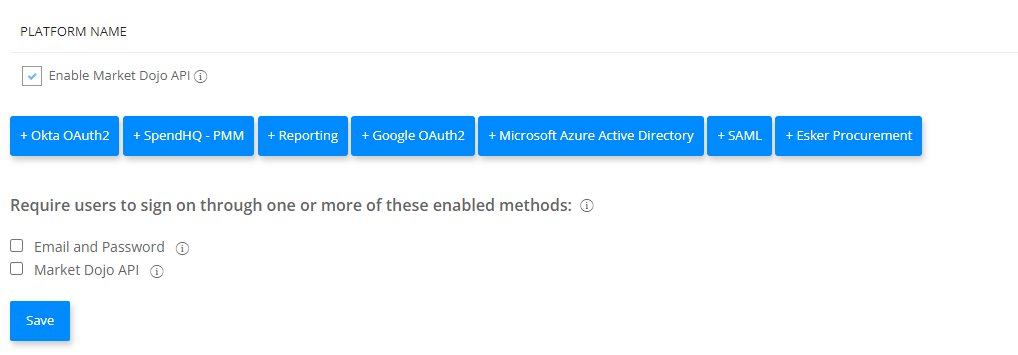
- Go to the Admin > Company Integration page
- Turn on the ‘Enable Market Dojo API’ tick box

- Click the ‘+ SpendHQ – PMM’ button
- On the popup, enter your SpendHQ URL. This will usually be of the format: companyname.spendhq.com
- Save the change.

Setting up the menu links
If you want links to Per Angusta to appear in your top menu, then please contact the Market Dojo support team.
Configuring for each User
Each user will need to setup the integration on their profile.
- Login to Market Dojo.
- Go to the User Profile page (by clicking on your name in the top right corner and choosing ‘Profile’)
- Scroll down, and find the option to Generate an API key. Make a note of API key
- Fill in the API key on your Per Angusta user profile and
- Note your Per Angusta API key.
- Go back to Market Dojo.
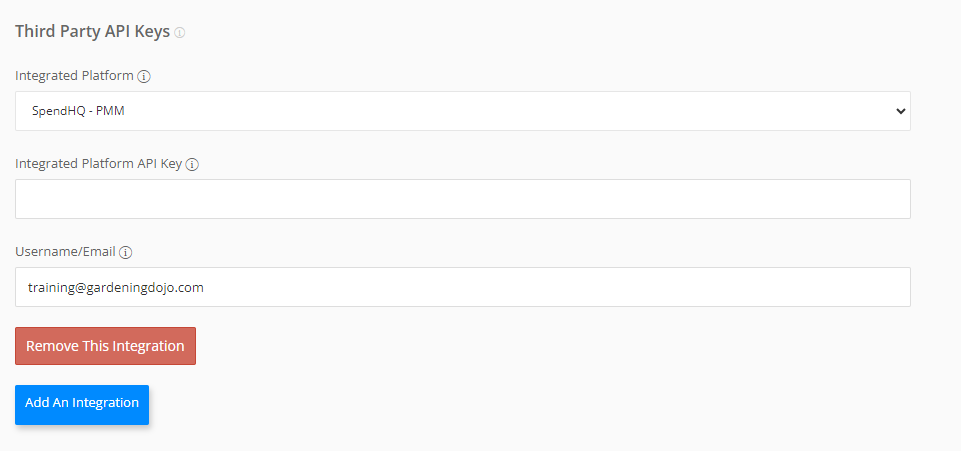
- On your Profile page, where you first got the Market Dojo API, ‘Add an Integration’.
- Select ‘SpendHQ’. Then paste your Per Angusta API key plus your email address.
- There is no Save button, but you can save the Profile changes at the bottom.
Next Steps
Check the integration works correctly.
- Move between systems using the menu links.
- Create new Market Dojo events from Per Angusta

 November 25, 2020