


Boost Sourcing Efficiency with Automated Supplier Selection and Lot Creation


ABOUT AUTOMATION
It’s more important than ever to ensure that your procurement activity is adherent to internal and regulatory requirements, and with limited resources it can be incredibly challenging, if not impossible, to monitor all of your company’s sourcing activity.
Whilst investing in an eSourcing solution is great for visibility and insights, an extra step is required to prevent erroneous behaviour (any mistakes, inaccuracies, or unintended actions within the system that could lead to problems or inefficiencies), and therefore reduce the need for reactive adjustments.
With that in mind, the Market Dojo team has been focusing on automating the Sourcing event creation process.
By pre-determining the elements of the event at every step, Procurement teams can be confident that users within the tool will be compliant, as well as reaping the benefits of improved efficiency.
An additional benefit is that by using standardised event structures, the opportunity for more granular and exact reporting is introduced as categorisation is now always available at the event, lot and supplier levels.
Watch the short demo below for more information:
SUPPLIER AUTO-SELECTION
This feature allows pre-approved suppliers to be added to the Sourcing event from Market Dojo Supplier Management without the need to find individual contacts.
The configuration starts with creating a joint Sourcing & Supplier Management custom field of type Checkbox; pick one from List or Multiple Choice. More information on how to do this can be found here.
With the Custom Field configured, you now need to categorise your supplier contacts. This can be done from within Supplier Management, by accessing an individual supplier view, see below.

Now that your supplier database is ready, the feature can be activated.
Within the Sourcing Settings page is a new option for ‘Automatic Supplier Selection’. The ‘enforced’ option will mean that suppliers must be selected from Supplier Management at event creation and cannot be added in any other manner.
When you next create a new event within Sourcing, the active Custom Fields will be shown on the right-hand side of the Settings tab.
Once you have navigated to the Invite Participants tab, a button will show in the top left for ‘Select from SRM’. On click, the system will take the Custom Field values on your Sourcing event, compare them to the values against each individual contact in the Supplier Management module and bring the matching individuals into the event.
EVENT AUTO-SELECTION
This feature provides buyers with the power to create the skeleton of their event by simply categorising their spend
First, you will need event templates in order to set the rules against them. From within a Sourcing event, on the Invite Participants screen is an option to ‘Save as Template’. On click, the structure of the event will be saved to a library for future use. For the purposes of automation, we would recommend keeping the event template quite simple, so you can build on it with further automated elements.
Now, within the Event Library screen you can click ‘Auto Selection Conditions’ to configure the automation rules.
The rules consist of conditions; which are each based on a single Custom Field along with the values that must be entered to meet the requirements. Between each condition is then a logic command; this determines whether condition 1 AND 2 must be met or condition 1 OR 2.
Our engine for rule building is highly customisable and can meet any requirement. If you would like guidance or for our Customer Success team to build this for you based on your requirements, please contact your Account Manager or our Support Team via the portal.
Finally, now that your lot library is ready, the feature can be activated. Within the Sourcing Settings page is a new option for ‘Automatic Event Template Selection’, which should be set to ‘Enabled’
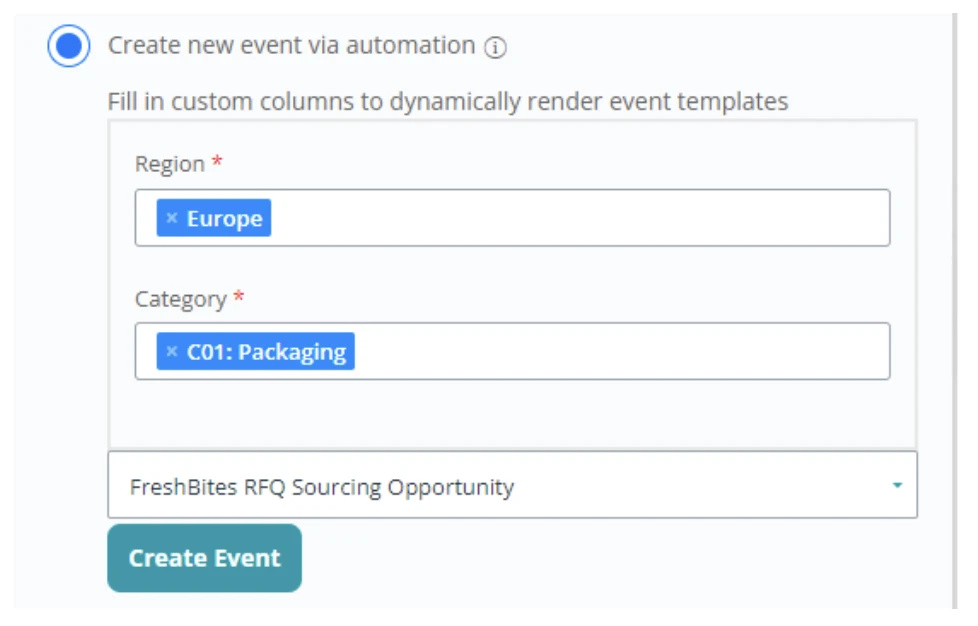
For future event creation, a new option will be shown to ‘Create new event via automation’, whereby users can complete the Custom Fields and will be presented with the Event Templates that match those rules. On click of ‘Create Event’ a new event will be created, based upon the templated event’s structure.
You can then go on to use the other automated features, detailed below, in combination to flush out your configuration further.
LOT, QUESTIONNAIRE & DOCUMENT AUTO-SELECTION
These features allow for lots, questionnaires and documents to be automatically added to your event without the need to add them individually or create from scratch.
In order for this auto-selection to be available, you will require Templates for whatever you are seeking to automate. For lots, these can be added when creating a new event and marking it as RFQ or Auction. For questionnaires, when adding a questionnaire to an event. And for documents, directly from the document library
With these Templates created, you can add the rules to them that determine when they are added to the event. Against each entry in the relevant Library admin page will be an option for ‘Auto Selection Conditions’. This rules engine matches the one created for Event Templates detailed above.
Now that your library is ready, the feature can be activated.
Within the Sourcing Settings page are several new options for ‘Automatic Template Selection’. These have a maximum of three options; select ‘enabled’ or ‘enforced’ based on your needs. Enabled will permit users to generate elements automatically, but they may then edit these or add their own if desired, whereas enforced will prevent editing of added elements..
When creating a new event within Sourcing, the active Custom Fields will be shown on the right-hand side of the Settings tab.
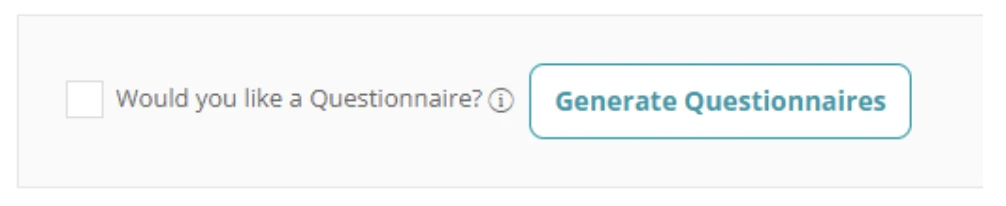
When you now navigate to the lot creation tab, questionnaire settings or document tab you have the ability to run the rules form the relevant library and based on the event’s Custom Field the corresponding elements will be added to the event.
If you have any questions about this new feature, please get in touch with your Account Manager or contact our Support Team via the portal or email [email protected]
More Resources
To learn more about how Market Dojo can help you streamline your processes, saving time and money, download our eGuide The Ultimate Guide to Power-Up Sourcing or Book a Demo with our sourcing specialists.
 September 5, 2024